50.pilot-media-management
Function Overview
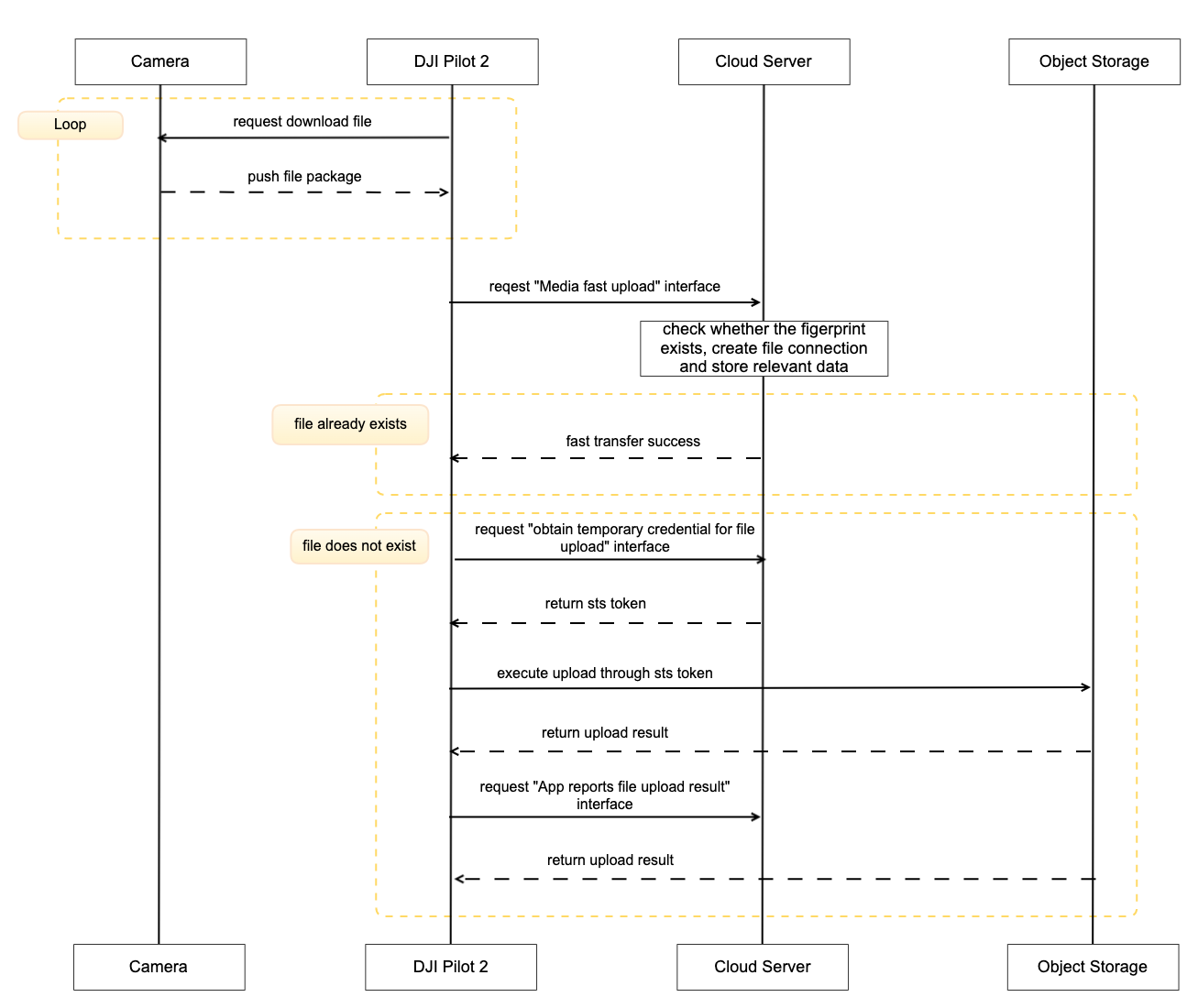
The media library is the function that helps Pilot2/DOCK to upload the photos/videos, downloaded from aircraft to the remote controller/dock, to the third-party server. Media upload function includes auto upload or manual upload. For DJI Dock, it has auto upload only.
We provide the Demo of media management function, and you can see the running result from Function Display Video. From that video, you can get how to configure the object storage, how to open the uploading switch automatically, the operation steps of automatic uploading and manual uploading. Media object storage support OSS and S3.

Interaction Sequence Diagram
Detailed API Realization
Load Media Library Module
window.djiBridge.platformLoadComponent(String name, String param)Before using the media library module, developer needs to set up the workspace ID in H5 through JSBridge, configure API module, and then load the DJI Pilot 2 media module. Also, developers can consider adding the loading interface of Media Library module in log-in phase.
Media Fast Upload As the transfer of files may exist in the cloud of existing images, then DJI Pilot 2 or dock will start the file fast transfer interface when uploading files, the server needs to check whether the file has been uploaded exists, if it exists, directly return the upload success.
Obtain Exist File Tiny Fingerprint For whether the file exists or not, the corresponding fingerprint verification needs to be done, but since media files vary in size, DJI provides a set of media file streamlined fingerprint generation schemes, and the server side only needs to calculate the media fingerprint information according to this scheme and return it to the DJI Pilot 2 side.
Obtain Temporary Credential For each media upload, you need to obtain temporary file upload credentials from the server, so that DJI Pilot 2 will bring the credentials to the object storage service for verification when uploading.
App Reports File Upload Result After the media file transfer is finished, DJI Pilot 2 will call this interface to inform the server of the corresponding media file upload result.
Last updated