40.https
Introduction
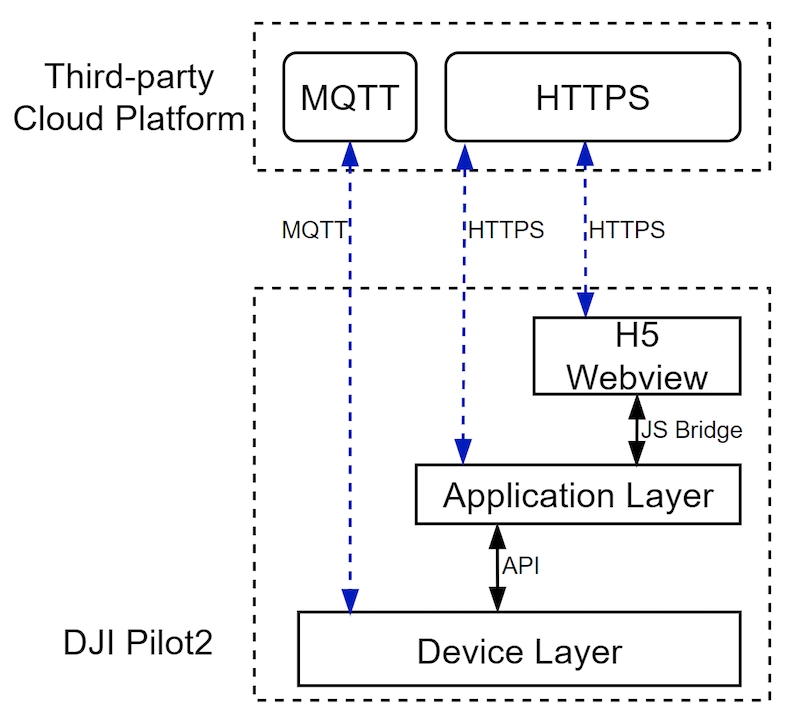
In addition to using the MQTT protocol in the Cloud API, some functions also require communication with the server via HTTP. As the tripartite business application has various scenarios, it is necessary to open a certain degree of freedom to combine business based on PILOT. So DJI Pilot 2.0 has an embedded Webview component, which can directly access the H5 webpage of the tripartite cloud platform by configuring the HTTP request URL link. On this web page, after logging in through the developer's custom account, you can exchange the token, MQTT gateway address and other information for HTTP communication access. After the Webview component gets this information, it is passed to Pilot application layer and device layer through the JSBridge interface, the application layer needs to bring the token for application business communication, and the device layer carries out MQTT authentication connection.
Interface Format
{URI-scheme}://{Endpoint}/{{module}}/api/{api_version}/{resouce_path}?{query_string}URI-scheme: enforces the use of secure https
Endpoint: service domain or ip
module : function module
api_version: api version number, used to manage api versions
resource_path: resource path
query_string: query parameter, not require
Request Method
The following request methods are supported.
GETPUTPOSTDELETE
The Content-Type of the request should be application/json.
Any interface can include the following parameter in the header:
Parameter
Type
Position
Required
Description
X-Auth-Token
String
header
Yes
token, access_token
X-Device-ID
String
header
No
Device ID number, used for sometimes the server needs to determine the model to do the corresponding processing. There is no need to use it for now.
X-Firmware-Version
String
Header
No
Firmware version of the aircraft
X-Request-ID
String
Header
No
Uuid, Identifies an HTTP request
Parameter specification:
GETDELETE: Parameter in queryPOSTPUT: The parameter is in the header, in json format.
Response Specification
{
   "code":0,
   "message":"string",
   "data": {},
}
Error Code
2xx: Success, the operation was successfully received and processed
200: The request was successful. Generally used for GET and POST requests
201: Created. Successfully requested and created a new resource
3xx: Redirect, further action required to complete request
301: Move permanently. The requested resource has been permanently moved to the new URI, the returned information will include the new URI, and the browser will be automatically directed to the new URI. Any new requests in the future should use the new URI instead
304: Not modified. The requested resource has not been modified, and no resource will be returned when the server returns this status code. Clients typically cache visited resources, by providing a header indicating that the client wishes to return only resources modified after a specified date
4xx: Client error, the request contained a syntax error or the request could not be completed
400: The syntax of the client request is incorrect and the server cannot understand it
401: The request requires user authentication
403: The server understands the request of the requesting client, but refuses to execute the request
404: The server cannot find the resource (web page) according to the client's request. With this code, web designers can set up a personalized page that says "the resource you requested could not be found"
410: The resource requested by the client no longer exists. 410 is different from 404. If the resource has been permanently deleted before, the 410 code can be used, and the website designer can specify the new location of the resource through the 301 code.
5xx: server error, the server encountered an error while processing the request
500: Internal server error, unable to complete the request
Corresponding error code behavior of DJI Pilot 2:
2xx
Normal Flow
Normal Flow
3xx
Normal Flow
Normal Flow
400
toast prompts "parameter error, please try again, or contact the administrator"
toast prompts "parameter error, please try again, or contact the administrator"
401
1. The toast prompts "The login to the cloud platform is invalid, please log in again" 2. The cloud platform does the cloud withdrawal processing
1. The cloud platform does the cloud withdrawal processing 2. The pop-up box prompts, go to login
403
toast prompts "You do not have permission to operate, please try again, or contact the administrator"
toast prompts "You do not have permission to operate, please try again, or contact the administrator"
404
toast prompts "the resource does not exist, please try again, or contact the administrator"
toast prompts "the resource does not exist, please try again, or contact the administrator"
5xx
toast prompts "server exception, please try again later (resp.code)"
toast prompts "server exception, please try again later (resp.code)"
Unknown
toast prompts "The network request is abnormal, please try again later (resp.code)"
toast prompts "The network request is abnormal, please try again later (resp.code)"
Last updated